Panda Antivirus - Detects and deletes all types of viruses. Keeps your PC free from spyware.
The new Panda Antivirus is the easiest-to-use protection for your computer. Just install it and forget about all viruses, spyware and online fraud. And you hardly have to lift a finger, so you can chat, share photos and videos with friends, read your favorite blogs or simply surf the Web, with complete peace of mind. And it's so light, you won't even notice it. If you want to purchase multiple licenses of this solution with telephone tech support included.
Includes:
- Antivirus
- AntiSpyware
- AntiPhishing
- AntiRootkit
Latest generation antivirus
Automatically detects and eliminates all types of viruses.
If content is missing from your hard disk, if you have problems starting your computer, or if some of your files are unusable, you can be sure you've been hit by a computer virus. You can be infected just by surfing the Net, downloading a file, or opening an email attachment. There are also the dangers of worms and Trojans which now use new stealth techniques to evade detection.
With Panda Antivirus 2008 you can use the Internet and download or share files in the knowledge that you are fully protected against all types of viruses, worms and Trojans. Forget about infections!
Powerful AntiSpyware
Keeps your PC free from spyware.
Computer slowdowns, annoying and aggressive pop-up ads, sudden changes to your system settings... these are just some of the effects that spyware can have on your PC. The real danger however is that these threats can steal information about your Internet activity and then use it without your knowledge.
Panda Antivirus 2008 detects and completely removes spyware and other annoying programs automatically. Safeguard your privacy!
AntiPhishing
Protects against online fraud.
Certain emails are designed to trick you into revealing your confidential bank details. They may appear to have been sent from your bank, but they have not. Falling into the trap can be costly: it could give the phishers complete access to your accounts. Panda Antivirus 2008 can identify these fraudulent emails, and prevent you from revealing your bank details, account numbers or other confidential information.
Panda Antivirus 2008 will keep you safe from these dangerous scams. Bank and shop online with complete peace of mind!
Protection against dangerous websites
Prevents access to websites harboring threats.
Many infections occur simply when you visit a certain web page. Panda Antivirus 2008 recognizes dangerous web pages and prevents you from opening them and becoming infected. This feature is particularly effective against certain types of spyware and online fraud. Surf the Internet safely!
AntiRootkit
Detects threats that try to hide on your PC.
Rootkits can be used to hide threats and prevent them from being detected by security solutions. These threats can then act with impunity on your system. With Panda Antivirus 2008 you won't have any problem, as its reinforced protection system can detect threats that use this stealth technique. Protect yourself from hidden threats!
Showing posts with label Panda. Show all posts
Showing posts with label Panda. Show all posts
Friday, January 4, 2008

Sunday, December 30, 2007
AntiVirus
Antivirus software consists of computer programs that attempt to identify, thwart and eliminate computer viruses and other malicious software (malware).
Antivirus software typically uses two different techniques to accomplish this:
a) Examining (scanning) files to look for known viruses matching definitions in a virus dictionary
b) Identifying suspicious behavior from any computer program which might indicate infection. Such analysis may include data captures, port monitoring and other methods.
Most commercial antivirus software uses both of these approaches, with an emphasis on the virus dictionary approach.
In the virus dictionary approach, when the antivirus software looks at a file, it refers to a dictionary of known viruses that the authors of the antivirus software have identified. If a piece of code in the file matches any virus identified in the dictionary, then the antivirus software can take one of the following actions:
1) delete the infected file
2) attempt to repair the file by removing the virus itself from the file
3) quarantine the file (such that the file remains inaccessible to other programs and its virus can no longer spread)
To achieve consistent success in the medium and long term, the virus dictionary approach requires periodic (generally online) downloads of updated virus dictionary entries. As civically minded and technically inclined users identify new viruses "in the wild", they can send their infected files to the authors of antivirus software, who then include information about the new viruses in their dictionaries.
Dictionary-based antivirus software typically examines files when the computer's operating system creates, opens, closes or e-mails them. In this way it can detect a known virus immediately upon receipt. Note too that a System Administrator can typically schedule the antivirus software to examine (scan) all files on the computer's hard disk on a regular basis.
Although the dictionary approach can effectively contain virus outbreaks in the right circumstances, virus authors have tried to stay a step ahead of such software by writing "oligomorphic", "polymorphic" and more recently "metamorphic" viruses, which encrypt parts of themselves or otherwise modify themselves as a method of disguise, so as to not match the virus's signature in the dictionary. [Wikipedia]
There are various type of antivirus available in market like Avast, AVG, Etrust, Kaspersky, McAfee, NOD 32, Panda, Norton, PC Cillin etc
Antivirus software typically uses two different techniques to accomplish this:
a) Examining (scanning) files to look for known viruses matching definitions in a virus dictionary
b) Identifying suspicious behavior from any computer program which might indicate infection. Such analysis may include data captures, port monitoring and other methods.
Most commercial antivirus software uses both of these approaches, with an emphasis on the virus dictionary approach.
In the virus dictionary approach, when the antivirus software looks at a file, it refers to a dictionary of known viruses that the authors of the antivirus software have identified. If a piece of code in the file matches any virus identified in the dictionary, then the antivirus software can take one of the following actions:
1) delete the infected file
2) attempt to repair the file by removing the virus itself from the file
3) quarantine the file (such that the file remains inaccessible to other programs and its virus can no longer spread)
To achieve consistent success in the medium and long term, the virus dictionary approach requires periodic (generally online) downloads of updated virus dictionary entries. As civically minded and technically inclined users identify new viruses "in the wild", they can send their infected files to the authors of antivirus software, who then include information about the new viruses in their dictionaries.
Dictionary-based antivirus software typically examines files when the computer's operating system creates, opens, closes or e-mails them. In this way it can detect a known virus immediately upon receipt. Note too that a System Administrator can typically schedule the antivirus software to examine (scan) all files on the computer's hard disk on a regular basis.
Although the dictionary approach can effectively contain virus outbreaks in the right circumstances, virus authors have tried to stay a step ahead of such software by writing "oligomorphic", "polymorphic" and more recently "metamorphic" viruses, which encrypt parts of themselves or otherwise modify themselves as a method of disguise, so as to not match the virus's signature in the dictionary. [Wikipedia]
There are various type of antivirus available in market like Avast, AVG, Etrust, Kaspersky, McAfee, NOD 32, Panda, Norton, PC Cillin etc
Friday, December 7, 2007
AntiVirus Installation (Symantec AntiVirus)
Anti Virus...
What is an AntiVirus software?
There are a lot of definition regarding AntiVirus...
- Antivirus software is a class of program that searches your hard drive and floppy disks for any known or potential viruses. ...
- A software program which helps protect a computer against being infected by a virus.
- Software that scans your computer's hard drive for all known traces of viruses. After the scanning is complete you can usually choose which viruses to delete. ...
- Antivirus software is a type of application you install to protect your system from viruses, worms and other malicious code. ...
And what is computer Virus?
There are also a lot of definition from different people...
- A computer virus is a piece of code that is secretly introduced into a system in order to corrupt it or destroy data. ...
- A dangerous computer program with the characteristic feature of being able to generate copies of itself, and thereby spread throughout the computer system. Additionally, most computer viruses have a destructive payload that is activated under certain conditions.
- A potentially damaging computer programme that affects or infects a computer negatively by altering the way the computer works, without the user's knowledge or permission
- A software program capable of reproducing itself and usually capable of causing great harm to files or other programs on the same computer
- A computer virus is a computer program that can copy itself and infect a computer without permission or knowledge of the user. The original may modify the copies or the copies may modify themselves, as occurs in a metamorphic virus. ...
etc.....
How to protect our computer from all these viruses?
It simples...Just install an AntiVirus program..
There are a lot of AntiVirus programs in the market...
For Example :
Panda,NOD32,Norton,Symantec,Avast,AVG,McAfee,Kaspersky etc....
In this section I would like to talk about installing Symantec AntiVirus...
First of course you need the setup file...
So double click the setup file...
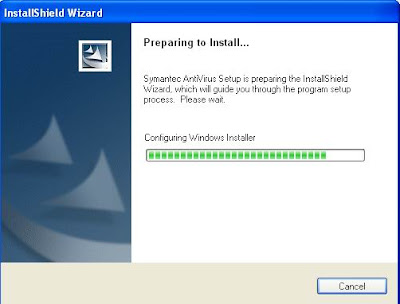
The setup will prepare to Install...
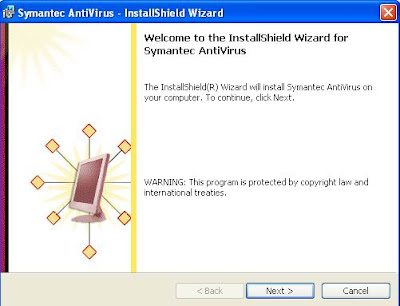 Press Next...
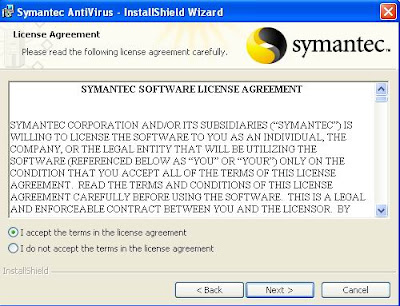 Select "I accept the terms in the License agreement" then press next...
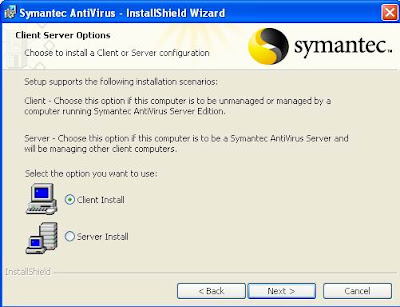
Choose the Client Option and press Next
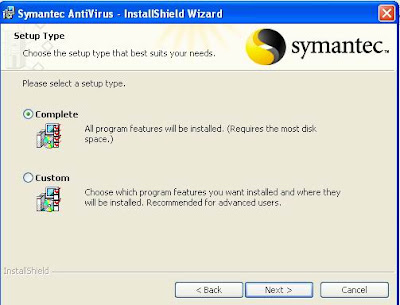
Complete setup type is recommended..
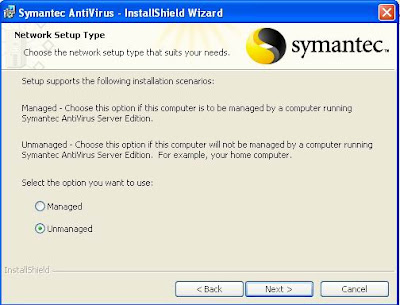
Then, choose Unmanaged is your computer is not managed by Symantec AntiVirus Server Edition..
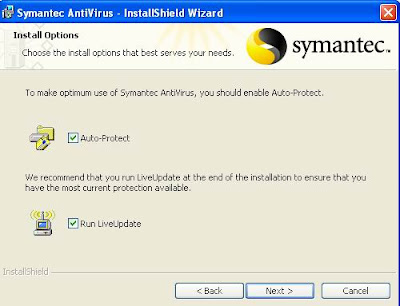
Then tick Auto-protect and Run LiveUpdate
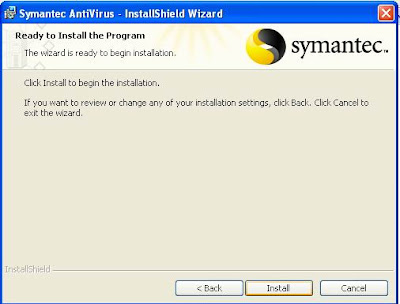
Press Install to start your installation...
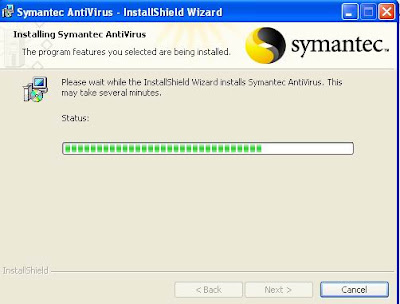
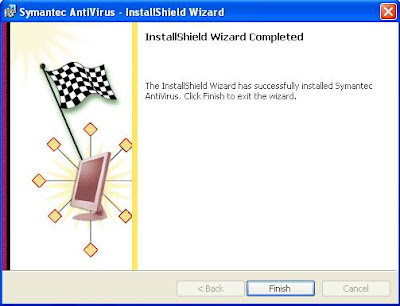
Press finish...
There are 2 way to update your Virus Definition...
1)
 Click the small icon at the bottom right beside your clock
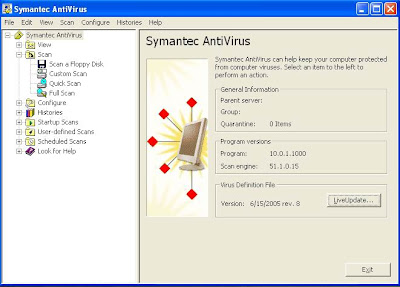 Then choose LiveUpdate...
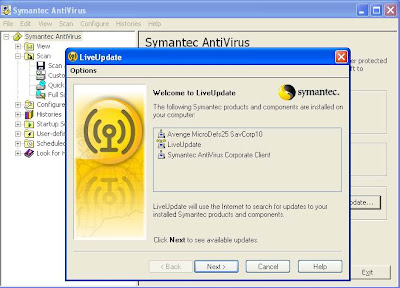
Press Next to start...
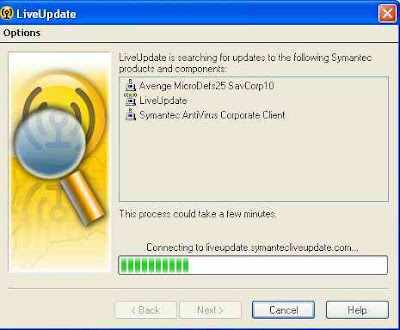
Your program will connect to server...
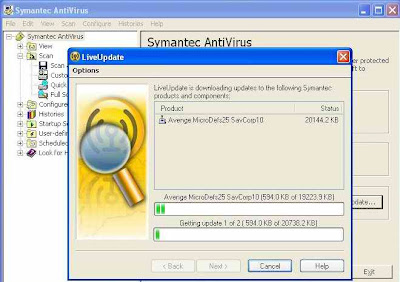
Then it will automatically download the most suitable Virus Definition for you...
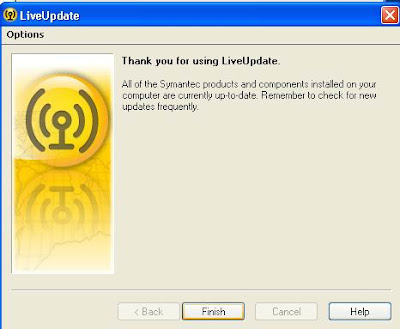
After that i click Finish to end...
2)
The second way is you need to log in to this website:
http://www.symantec.com/avcenter/download/pages/US-N95.html
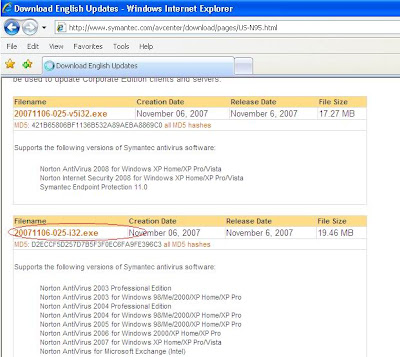
See the virus definition above...download it...
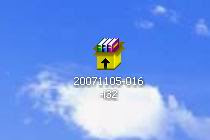
Install the virus definition...
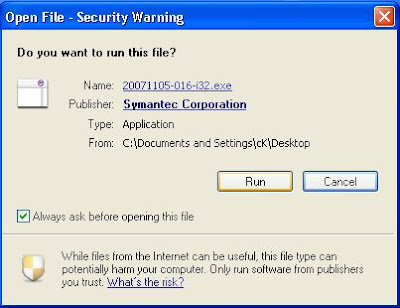
Run the file...
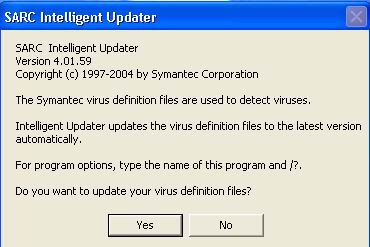
Press Yes to update your Virus Definition files...
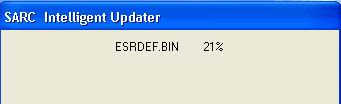
It will start to install and finish...
What is an AntiVirus software?
There are a lot of definition regarding AntiVirus...
- Antivirus software is a class of program that searches your hard drive and floppy disks for any known or potential viruses. ...
- A software program which helps protect a computer against being infected by a virus.
- Software that scans your computer's hard drive for all known traces of viruses. After the scanning is complete you can usually choose which viruses to delete. ...
- Antivirus software is a type of application you install to protect your system from viruses, worms and other malicious code. ...
And what is computer Virus?
There are also a lot of definition from different people...
- A computer virus is a piece of code that is secretly introduced into a system in order to corrupt it or destroy data. ...
- A dangerous computer program with the characteristic feature of being able to generate copies of itself, and thereby spread throughout the computer system. Additionally, most computer viruses have a destructive payload that is activated under certain conditions.
- A potentially damaging computer programme that affects or infects a computer negatively by altering the way the computer works, without the user's knowledge or permission
- A software program capable of reproducing itself and usually capable of causing great harm to files or other programs on the same computer
- A computer virus is a computer program that can copy itself and infect a computer without permission or knowledge of the user. The original may modify the copies or the copies may modify themselves, as occurs in a metamorphic virus. ...
etc.....
How to protect our computer from all these viruses?
It simples...Just install an AntiVirus program..
There are a lot of AntiVirus programs in the market...
For Example :
Panda,NOD32,Norton,Symantec,Avast,AVG,McAfee,Kaspersky etc....
In this section I would like to talk about installing Symantec AntiVirus...
First of course you need the setup file...
So double click the setup file...
The setup will prepare to Install...

 Press Next...
 Select "I accept the terms in the License agreement" then press next...
Choose the Client Option and press Next

Complete setup type is recommended..

Then, choose Unmanaged is your computer is not managed by Symantec AntiVirus Server Edition..

Then tick Auto-protect and Run LiveUpdate

Press Install to start your installation...


Press finish...
There are 2 way to update your Virus Definition...
1)
 Click the small icon at the bottom right beside your clock
 Then choose LiveUpdate...
Press Next to start...

Your program will connect to server...

Then it will automatically download the most suitable Virus Definition for you...

After that i click Finish to end...
2)
The second way is you need to log in to this website:
http://www.symantec.com/avcenter/download/pages/US-N95.html

See the virus definition above...download it...

Install the virus definition...

Run the file...

Press Yes to update your Virus Definition files...

It will start to install and finish...
Subscribe to:
Posts (Atom)


